
Comparison
Clarity vs Selka
Selka is built for dating: you upload screenshots of a chat and its AI gives a red-flag report, a dating-coach tip and extras like voice-note analysis and comparing two people. Clarity is built for looking at a whole conversation over time: you can import a full chat export as well as screenshots or pasted text, pattern detection runs on your phone, and every red flag shows the messages behind it. Selka sends what you scan to its AI provider; Clarity sends nothing unless you ask for an AI report, and then only a short summary.
Side by side
As seen on October 24–25, 2026, on Google Play and in each app on an Android phone.
| Clarity | Selka | |
|---|---|---|
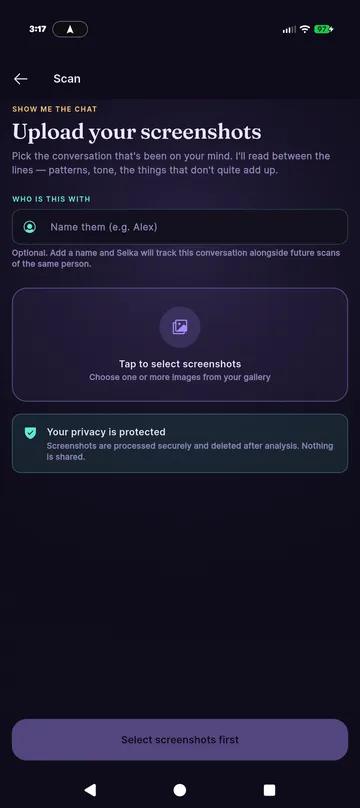
| What you give it | A whole chat export (WhatsApp, Messenger, Instagram, Android texts, Telegram and more), screenshots, or pasted text | Screenshots (the Paste option opens a screenshot upload) and voice notes |
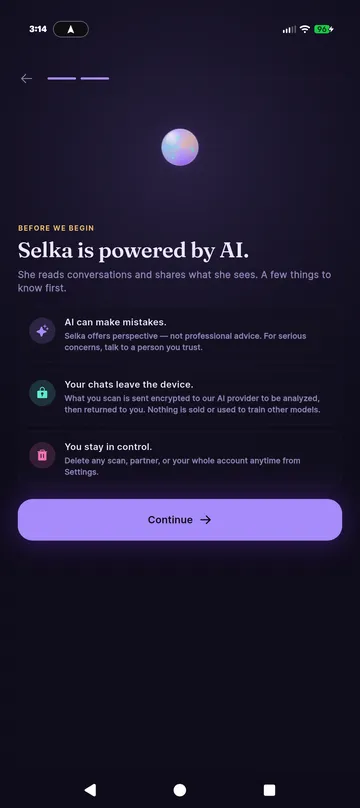
| Where the reading happens | Pattern detection and screenshot reading on your phone; AI reports send a short summary only when you ask | Its own first-run screen says: “Your chats leave the device. What you scan is sent encrypted to our AI provider to be analyzed” |
| Shows the messages behind each flag | Yes | Not checked: we stopped before a paid scan |
| Free to try | First conversation fully, plus 3 AI reports | Free to install; scans use credits. Premium is listed as unlimited scans |
| Prices on Google Play | Monthly $12.99 or lifetime $99.99; no weekly plan | In-app products $9.99–$12.99 per item |
| Ads | None | The listing says no ads; our first launch opened a full-screen ad card titled “Activate Your Account” |
| Languages | English only for now | Offers a choice of languages at first launch |
| Made for | Any relationship: partner, ex, family, co-parent, friend, work | Dating: Tinder, Hinge, Bumble, situationships, comparing two partners |
What Selka does well
- A friendly first run. A short quiz, a clear note that AI can make mistakes, and permissions asked with reasons and a “decide later” option.
- Dating-specific extras. Voice-note analysis, “partner compare” to put two people side by side, attachment-style reads and weekly reports.
- Honest about AI. It tells you up front that your chats are sent to an AI provider, and that it offers perspective, not professional advice.
Where Clarity is different
- Whole conversations, not just screens. A screenshot shows a few messages. A chat export can hold months or years, which is where patterns show up. Clarity reads exports from WhatsApp, Messenger, Instagram, Android texts, Telegram and more, and screenshots when there's no export. How to export a chat.
- Your phone does the reading. Pattern detection and screenshot reading run on the phone. An AI report is optional and sends a summary: pattern statistics and up to 20 short excerpts, never the full conversation. Details in our privacy policy.
- Receipts. Each red flag lists the actual messages behind it, with dates, so you can judge for yourself.
- No ads.
Which should you use?
If you're dating and want a quick, coach-style read of a few screenshots, with voice notes and partner comparisons, Selka is built for that. If you want to look at a whole conversation with anyone, see the messages behind every flag, and keep the reading on your phone, try Clarity. Both are free to install, so you can try each one.
Try Clarity
Clarity is a free Android app. Check your first conversation free, start to finish, and see the messages behind every red flag.
Get Clarity on Google PlayNeed the chat out of your messaging app first? See how to export it.
Questions
Does Selka send my chats to a server?
Selka’s own first-run screen says your chats leave the device: what you scan is sent encrypted to its AI provider to be analyzed and then returned. Clarity runs pattern detection on your phone and sends nothing unless you ask for an AI report, which sends a short summary rather than the conversation.
Can Selka read a WhatsApp export?
Selka is screenshot-based: its scan screen asks you to select screenshots, and the Paste option opened a screenshot upload when we tried it. Clarity can import a full WhatsApp export, as well as screenshots and pasted text.
Is Selka free?
Selka is free to install and lists in-app products from $9.99 to $12.99 on Google Play. Scans use credits; Premium is listed with unlimited scans. Clarity checks your first conversation in full for free and includes 3 AI reports.
Which is better for dating?
Selka is made for dating and has dating-specific extras such as comparing two partners. Clarity works for any relationship, including dating, and is better suited to looking at a long conversation as a whole.
Sources
- Selka: Dating Red Flag Scanner on Google Play (listing read October 25, 2026)
- Our first run of Selka on an Android phone, October 24, 2026 (screenshots above)
- Clarity privacy policy